
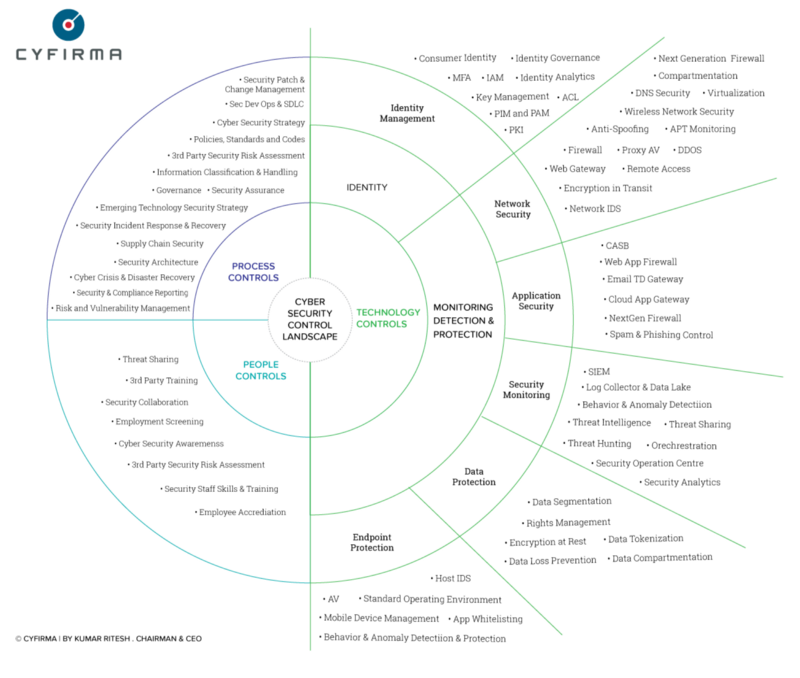
Every device you own, every account you log into, and every file you store is a door — and somewhere, someone is quietly testing the locks. Cybersecurity is not a product you buy once or a switch you flip; it is a set of everyday habits that keep those doors closed to the people who should not walk through them. The good news is that the vast majority of attacks succeed not because the criminals are brilliant, but because ordinary defenses were missing. Master a handful of best practices and you move yourself out of the “easy target” pile that most attackers depend on to make a living.
🔐 What Is Cybersecurity?
Cybersecurity is the practice of protecting systems, networks, devices, and data from unauthorized access, theft, damage, and disruption. It spans everything from the password on your phone to the encryption protecting a bank’s servers — but at its core it is about reducing risk to a level you can live with, because perfect security does not exist.
It helps to think in three foundational pillars, often called the CIA triad:
- 🤫 Confidentiality keeps information visible only to the people who are supposed to see it — through passwords, encryption, and access controls that lock everyone else out.
- ✅ Integrity ensures data is accurate and has not been tampered with — so a bank balance, a medical record, or a contract you signed cannot be silently altered.
- 🟢 Availability makes sure systems and data are accessible when you actually need them — defending against outages, ransomware lockouts, and denial-of-service attacks that hold access hostage.
Almost every threat you will ever face is an attack on one of these three pillars. When you understand which pillar is under fire, you understand what you are truly defending — and that clarity makes every other decision easier.
🎯 Why Cybersecurity Matters
The strongest argument for taking security seriously is that the cost of ignoring it has never been higher. A single compromised account can cascade into drained bank balances, stolen identity, locked-up business files, and months of cleanup.
It protects your money and identity. Stolen credentials are sold in bulk and reused everywhere. One breached password can open your email, and email is the master key that resets nearly every other account you own.
It safeguards the people who trust you. If you run a business or manage a team, a breach exposes your customers’ data too — eroding trust that took years to build and can trigger legal and regulatory consequences.
It prevents small mistakes from becoming disasters. Good practices contain damage. When one layer fails, another catches the fall, so a single stolen password does not hand over your entire digital life.
It saves enormous time and stress. Recovering from ransomware or identity theft can consume weeks. An hour spent on prevention today typically saves days of painful recovery later — a trade almost no one regrets.
📈 The Threats That Actually Matter
One of the biggest traps in security is fixating on exotic, movie-style hacking while ignoring the plain, high-volume attacks that actually reach ordinary people. The threats below are the ones you will realistically encounter, organized by how they typically unfold, each with a real-world example so you know what to watch for.
Social Engineering
- 🎣 Phishing — fake emails, texts, or sites that trick you into handing over credentials or clicking a malicious link. Example: an email that looks like it is from your bank, urging you to “verify your account now” through a link that leads to a lookalike login page.
- 📞 Vishing and smishing — the same con delivered by phone call or SMS, often impersonating support staff or delivery services.
- 🎭 Pretexting — an attacker invents a believable story (“I’m from IT, I need your login to fix an issue”) to talk a target into cooperating.
Malicious Software
- 🔒 Ransomware — encrypts your files and demands payment to unlock them, often spreading across an entire network. Example: a single infected attachment can freeze every shared drive in a small office within minutes, halting the business until backups restore it.
- 🕵️ Spyware and keyloggers — quietly record what you type and see, harvesting passwords and card numbers in the background.
- 🐴 Trojans — malware disguised as legitimate software, such as a “free” cracked app that installs a backdoor along with it.
Access and Network Attacks
- 🔑 Credential stuffing — attackers take passwords leaked from one breach and try them on your other accounts, betting you reused them. Example: a password stolen from an old forum in 2019 still unlocks a matching email account today because it was never changed.
- 📡 Man-in-the-middle attacks — intercepting data on unsecured networks, like a fake public Wi-Fi hotspot in a café.
- 💥 Brute-force attacks — automated tools guessing passwords at massive speed, which is exactly why length and uniqueness matter so much.
⭐ The single most important habit: multi-factor authentication (MFA)
If you do only one thing, turn on MFA everywhere it is offered. It requires a second proof of identity — a code, a tap, or a hardware key — beyond your password. Even if a criminal steals your password, MFA blocks the overwhelming majority of account takeovers, because they cannot produce that second factor. It is the highest-impact, lowest-effort defense available to anyone.
📋 Best-Practices Cheat-Sheet (Quick Reference)
| Practice | What it does | Priority | Where to apply it |
|---|---|---|---|
| 🔑 Strong unique passwords | Stops one breach spreading to all accounts | Critical | Every login |
| 📱 Multi-factor authentication | Adds a second identity check | Critical | Email, banking, work |
| 🔄 Software updates | Patches known security holes | High | OS, apps, firmware |
| 💾 Regular backups | Recovers data after ransomware or loss | High | 3-2-1 rule (see below) |
| 🛡️ Antivirus / EDR | Detects and blocks malware | Medium | All devices |
| 📶 VPN on public Wi-Fi | Encrypts traffic on untrusted networks | Medium | Cafés, airports, hotels |
| 🎓 Security awareness | Helps you spot scams before you click | High | You and your team |
🛠️ The Core Tools You Need
You do not need an expensive security suite to be well protected. The table below covers the fundamentals for individuals and small teams — and as always, the discipline of using these tools consistently matters far more than owning the most premium brand.
| Tool | Best for | Free tier? | Difficulty |
|---|---|---|---|
| 🔐 Bitwarden / 1Password | Generating & storing passwords | Bitwarden yes | Easy |
| 📲 Authenticator app | MFA codes without SMS risk | Yes | Easy |
| 🔑 Hardware key (YubiKey) | Phishing-resistant strong MFA | No | Medium |
| 🛡️ Built-in OS defender | Baseline malware protection | Yes | Easy |
| 📶 Reputable VPN | Encrypting public-network traffic | Limited | Easy |
| 💾 Backup service | Automated off-site copies | Limited | Easy |
| 🚨 Breach monitor | Alerts when your data leaks | Yes | Easy |
A password manager you actually use every day beats an elaborate security policy that lives forgotten in a document no one opens.
🔗 Understanding Authentication Factors
Authentication is how a system confirms you are who you claim to be. Every method falls into one of a few “factor” types, and strong security comes from combining factors from different categories — so that stealing one is not enough to get in.
| Factor type | What it is | Examples | Watch out for |
|---|---|---|---|
| 🧠 Knowledge | Something you know | Passwords, PINs, security questions | Guessable, reusable, phishable |
| 📱 Possession | Something you have | Phone codes, hardware keys, passkeys | Can be lost or, for SMS, hijacked |
| 👤 Inherence | Something you are | Fingerprint, face, voice | Cannot be changed if compromised |
| 📍 Location | Somewhere you are | Geofencing, trusted networks | Spoofable with VPNs |
| ⏱️ Behavior | Something you do | Typing rhythm, usage patterns | Still maturing, false positives |
The strongest everyday setup pairs a knowledge factor with a possession factor — ideally a passkey or hardware key rather than an SMS code, since text messages can be intercepted or diverted through SIM-swap fraud. When a service offers passkeys, adopting them removes the password as a target entirely.
🧭 7-Step Security Framework (Checklist)
Good security is built on a clear, repeatable structure rather than occasional panic. Work through this checklist in order — you can literally tick each box as you harden your digital life or your organization.
💡 Worked Example: A Small Business Applies This
Raj runs a small accounting practice with four employees and a lot of sensitive client data. After a competitor was hit by ransomware, he decides to get serious. Here is how he applies the framework:
- 📋 Inventory & risk: He lists every account and finds the biggest risk is client tax files stored on one shared drive with no backup.
- 🔐 Fundamentals: He rolls out Bitwarden for the team, forces MFA on email and the accounting software, and enables automatic updates on all machines.
- 🛡️ Least privilege: He removes admin rights from daily user accounts and gives each employee access only to the clients they handle.
- 💾 Backups: He sets up automated encrypted backups following the 3-2-1 rule and tests a restore to confirm it works.
- ✅ The result: Two months later, an employee clicks a phishing link — but MFA blocks the login, the malware cannot spread from a limited account, and backups stand ready. What could have shut the firm down becomes a minor incident.
Nothing here required a security team or a big budget. It required identifying the real risks and applying a few disciplined controls where they mattered most.
⚠️ Common Security Mistakes to Avoid
Reusing passwords across sites. One breach then unlocks everything. A password manager makes unique passwords effortless, so there is no longer any excuse to reuse them.
Ignoring software updates. Those “update later” prompts often patch security holes that attackers are already exploiting in the wild. Delaying leaves a known door wide open.
Trusting urgency. Scammers manufacture panic — “your account will be closed in an hour” — to short-circuit your judgment. Slow down and verify through official channels before acting.
Skipping backups. People assume ransomware happens to others until their files are encrypted. A tested backup is the only reliable answer to ransomware, and it must exist before the attack.
Oversharing on social media. Birthdays, pet names, and hometowns feed both security-question guessing and convincing personalized scams. Treat that information as security-relevant.
Assuming small means safe. Attackers automate at scale and do not care how big you are. Small businesses and individuals are often targeted precisely because their defenses are weaker.
📖 Glossary of Key Terms
- 🎣 Phishing: A scam that impersonates a trusted sender to trick you into revealing credentials or clicking malicious links.
- 🔒 Ransomware: Malware that encrypts your files and demands payment to unlock them.
- 📱 MFA (Multi-Factor Authentication): A login that requires two or more independent proofs of identity, such as a password plus a phone code.
- 🗝️ Encryption: Scrambling data so it is unreadable without the correct key, protecting it in transit and at rest.
- 🔑 Passkey: A passwordless credential tied to your device that resists phishing and cannot be reused after a breach.
- 🛡️ Zero trust: A model that verifies every access request rather than trusting anything inside the network by default.
- 🚪 Attack surface: The total set of entry points — accounts, devices, and services — that an attacker could try to exploit.
- 🎭 Social engineering: Manipulating people, rather than technology, into breaking security or giving up information.
❓ Frequently Asked Questions
What is the single most important thing I can do for my security?
Are password managers actually safe to use?
How often should I change my passwords?
Is free antivirus good enough?
How can I tell if an email is a phishing attempt?
What should I do if one of my accounts is hacked?
Is public Wi-Fi really dangerous?
What is the difference between a virus and ransomware?
Should I pay if I get hit by ransomware?
Are passkeys better than passwords?
Is cybersecurity only a concern for big companies?
🏁 Conclusion
Cybersecurity is not about fear or about turning yourself into a paranoid expert. It is about clarity — knowing what you are protecting, understanding the handful of threats you will actually face, and putting a few reliable defenses between them and you. Strong unique passwords, multi-factor authentication, timely updates, and tested backups are not glamorous, but together they stop the overwhelming majority of attacks before they start.
You do not need a big budget or a technical background to be genuinely secure. You need consistency and a willingness to build good habits before you ever need them. Start with the fundamentals, keep them current, and stay a little skeptical of anything that demands urgent action — and you will spend far less of your life cleaning up messes that never had to happen.
👉 Next step: Turn on multi-factor authentication for your primary email account right now, then install a password manager this week. Those two moves alone put you ahead of most people online. Explore more of our security guides to keep hardening your defenses.
